Data & methodology
Where every number on fruitycanyon actually comes from: the Daily Home Value Index behind the Australian Home Prices dashboard, and the Property Map's Data SA suburb data behind the Property Map. Full provenance, transformations, field-by-field glossaries, and known limitations for both — nothing trimmed, only explained.
Daily Home Value Index
- Source
- A property data and analytics provider. The figures reach FruityCanyon indirectly: the Daily Home Value Index is shared publicly on X (Twitter) by @rabbit_wealth (“rabbittail”), and FruityCanyon transcribes the numbers from those posts. FruityCanyon has no affiliation with, endorsement from, or licence from the original index provider or @rabbit_wealth. This is an independent, personal project.
- Dataset / product
- Daily Home Value Index
- Coverage
- Sydney, Melbourne, Brisbane, Adelaide, Perth, plus a 5-capital aggregate
- Observation frequency
- Daily
- Collection method
- Manually transcribed by hand from four tables shared as screenshots on X (Twitter) by @rabbit_wealth each day (Price Changes %, Market Metrics, Index levels, Price Changes per $1M). Not an automated feed, and not a direct subscription with the index provider. See “What the index provider publishes vs. what FruityCanyon calculates” below.
- Date range
- loading…
- Last updated
- loading…
- Collected & transcribed by
- FruityCanyon
- Status
- Independently transcribed for personal analysis, not an official publication of the index provider. Transcription is manual, so occasional entry errors are possible. See Limitations below.
- Licensing status
- FruityCanyon has not obtained a licence or written permission from the index provider to republish these figures, and is currently reviewing this, including whether to seek permission. All rights in the underlying data remain with the index provider and its licensors. If the index provider asks, this data will be removed.
Where this data comes from
A fixed example, added 10 Sep 2026, using a set of screenshots from 1 Aug 2026, showing exactly what @rabbit_wealth's four source tables look like and which fields they become in FruityCanyon's data. This isn't a live feed and won't change day to day. It's here once, to make the source chain concrete rather than just described in prose.
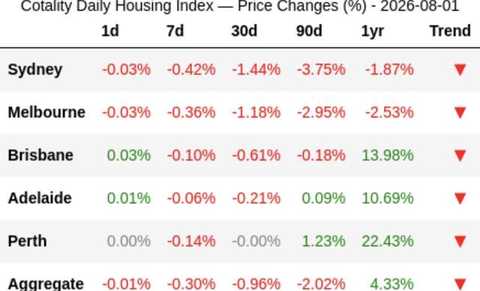
pct_1d, pct_7d, pct_30d and pct_90d.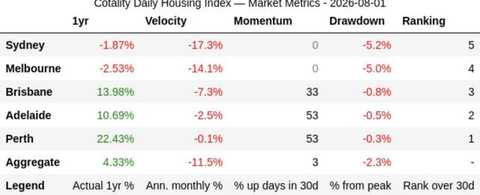
velocity_ann_monthly_pct, momentum_up_days_pct_30d, drawdown_from_peak_pct and rank_30d; the 1yr column here becomes pct_1yr.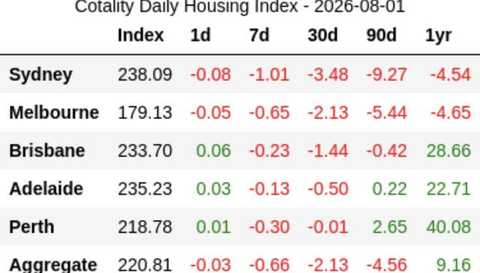
index.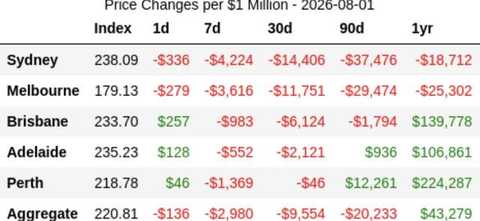
dollar_per_1m_1d through dollar_per_1m_1yr.How to read this dashboard
- 30-day pace / annualised momentum
- How fast a city's prices have moved over the last 30 days, expressed as an annual rate. This is the index provider's own published figure, transcribed as-is. It is not a FruityCanyon forecast, prediction, or expected annual growth figure. Short-term rates like this can be volatile and are not a reliable guide to what the next 12 months will actually do.
- 1-year change
- The index provider's own official trailing 12-month figure for that city.
- Momentum / rank / drawdown
- All the index provider's own published Market Metrics figures, transcribed as-is.
- $ impact figures
- Most dollar figures on the dashboard (the “$1M home” chart) are also the index provider's own published Price-Changes-per-$1M figures. One exception is flagged below.
- “Price change since …” chart
- Built from the index provider's published index levels, with one adjustment: the index provider periodically revises its whole index series, seen so far on the first business day of a month (3 Aug and 1 Sep 2026). On those days the index level steps down sharply while the index provider's own 1-day change for the same day is close to 0%. Left alone, that revision looks like a one-day crash. For those days only, the chart uses the index provider's own 1-day % change instead of the index step. See the formula below.
- “$ toll since the peak” chart
- This one is a FruityCanyon calculation (see the formula below), and is marked with a “Calculated by FruityCanyon” badge on the chart itself.
- Not a forecast
- Every figure on this page and the dashboard describes what has already happened. Nothing here predicts, forecasts, or guarantees future prices.
What the index provider publishes vs. what FruityCanyon calculates
Almost everything on this dashboard is a number the index provider itself computes and displays. FruityCanyon copies it by hand from a screenshot. The one calculation FruityCanyon actually performs is turning a drawdown percentage into a dollar figure.
The index provider compiles the index. @rabbit_wealth posts screenshots of it on X (Twitter). FruityCanyon transcribes the numbers from those posts into this site's dataset. FruityCanyon does not have a direct subscription or feed with the index provider.
Sourced directly from the index provider, transcribed and not calculated by FruityCanyon: index level, 1-day / 7-day / 30-day / 90-day % change, 1-year % change, the annualised 30-day pace (“velocity”), the momentum score, the 30-day rank, the drawdown-from-peak %, and the $-per-$1M change figures. These all come from the index provider's own Market Metrics and Price-Changes tables. FruityCanyon does not compute, annualise, or otherwise derive any of them.
Calculated by FruityCanyon: the “$ toll since the peak” chart, and the revision adjustment on the “Price change since …” chart (explained below).
Simple explanation
We take the index provider's own “how far below peak” percentage for a city and scale it to what that would mean in dollars, for a hypothetical $1,000,000 home.
Technical formula
dollar_toll_since_peak = drawdown_from_peak_pct × ($1,000,000 ÷ 100)
                       = drawdown_from_peak_pct × $10,000
Example: a drawdown of −7.2% becomes −7.2 × $10,000 = −$72,000. drawdown_from_peak_pct itself is the index provider's own published figure; only the dollar conversion is FruityCanyon's.
Price change chart: revision days
The line adds up each day's move since the first tracked day. On a normal day that move comes straight from the index provider's index. On a day where the index provider has revised its series, the index jumps but the index provider's own 1-day change doesn't, so we use the index provider's 1-day change for that day instead. Nothing is estimated: both numbers come from the index provider.
for each step from one day to the next calendar day:
  move = index_today ÷ index_yesterday − 1
  if |move − pct_1d| > 0.15 percentage points:
      move = pct_1d        (index revision day)
line = running product of (1 + move), minus 1
Steps across a gap in the data (like a weekend with no capture) always use the index move, because the index provider's 1-day figure only covers one day. The downloadable CSV is unchanged and still holds the index provider's index levels exactly as published. Because of this adjustment, the chart's end figures differ from simply comparing today's index with the first day's.
Field glossary
Full field-by-field definitions for both datasets on this site — every column in the Daily Home Value Index above and the Property Map's suburb dataset below, one by one — are kept as a downloadable PDF rather than an on-page table, to keep this page shorter: Download the field glossary (PDF).
Download the data
Every capital, every captured day, plus a short daily written note, as a CSV: download australian-home-prices.csv. Regenerated from this page's own data at request time, so it's always current as new days are added — this is now the full day-by-day record; nothing is browsable on this page itself any more. It covers the columns described in the field glossary above (index, velocity, momentum, drawdown, 1-year %, the 30-day $ toll, rank, and the daily note), not the extra columns in FruityCanyon's private working spreadsheet (per-horizon dollar figures beyond 30 days, and a reserved column that's never been populated).
Limitations
- FruityCanyon is an independent, personal analysis project and should not be treated as an official publication of the index provider, endorsed by the index provider, or a substitute for the index provider's own reporting.
- This data passes through two manual steps before it reaches this site: @rabbit_wealth's own capture of the index provider's index (a process FruityCanyon has no visibility into), then FruityCanyon's transcription of those posts into this dataset. Manual transcription at either step can introduce errors, even with cross-checks in place.
- Short-term annualised figures (like the 30-day pace) can swing sharply on limited data and should not be read as a prediction of the next 12 months.
- Nothing on this site is financial advice. It describes recent, historical market movement; it does not account for future interest rates, supply, demand, policy changes, or other factors that influence property prices.
- Some days are missing from the dataset (see the CSV download above for the full day-by-day record). Gaps are left as gaps, not estimated or filled in.
Property Map — Suburb Median House Prices
Data behind the interactive suburb map.
- Source
- Data SA, South Australian Government quarterly median house price releases.
- Original measure
- Median house sale price, sales volume, and year-on-year growth, for the quarter, per suburb.
- Geography
- Suburb (as grouped by local government area in the source files)
- Observation frequency
- Quarterly
- Date range
- 2014 Q1 – 2026 Q2 (as of 11 Sep 2026)
- Collection method
- Downloaded directly from Data SA's published quarterly spreadsheets and imported programmatically — not manually transcribed (unlike the index dataset above).
- FruityCanyon transformation
- Growth is converted from the source file's decimal fraction to a percentage. Suburbs listed under more than one council area in the source are de-duplicated. Quarters with zero recorded sales carry forward the suburb's last known median price rather than showing a gap.
- Status
- Independent, personal project. Not an official Data SA publication, and not financial or property advice.
Property Map — source data & licensing
Every figure traces back to the Government of South Australia's own quarterly release, Metro median house sales (Data.SA), published under a Creative Commons Attribution 4.0 licence, which permits redistributing the raw files with attribution.
Attribution: Department for Housing and Urban Development, Government of South Australia, “Metro median house sales”, Data.SA, quarterly files sourced June–September 2026, https://data.sa.gov.au/data/dataset/metro-median-house-sales. Licensed under CC BY 4.0.
Changes made by FruityCanyon: growth converted to a percentage, duplicate suburbs merged, and zero-sales quarters carried forward (see the Property Map section above). The downloadable files below are unchanged.
FruityCanyon is not affiliated with or endorsed by the Government of South Australia. Note: Data.SA's portal-wide licence is CC BY 4.0, while the data.gov.au mirror of this dataset lists CC BY 3.0 Australia. Both allow reuse with attribution.
Property Map — download the source files
The original quarterly spreadsheets from Data.SA that the Property Map is built from, hosted here under their CC BY 4.0 licence. Each file is unchanged from the copy downloaded from Data.SA, apart from being renamed so they sort by quarter. 2020 Q4 is not included because FruityCanyon's copy is not the original file; download that quarter from Data.SA directly.
- 2026 Q2 (37 KB)
- 2026 Q1 (36 KB)
- 2025 Q4 (40 KB)
- 2025 Q3 (40 KB)
- 2025 Q2 (37 KB)
- 2025 Q1 (37 KB)
- 2024 Q4 (37 KB)
- 2024 Q3 (37 KB)
- 2024 Q2 (37 KB)
- 2024 Q1 (36 KB)
- 2023 Q4 (37 KB)
- 2023 Q3 (37 KB)
- 2023 Q2 (38 KB)
- 2023 Q1 (37 KB)
- 2022 Q4 (37 KB)
- 2022 Q3 (39 KB)
- 2022 Q2 (36 KB)
- 2022 Q1 (35 KB)
- 2021 Q4 (35 KB)
- 2021 Q3 (33 KB)
- 2021 Q2 (34 KB)
- 2021 Q1 (34 KB)
- 2020 Q3 (33 KB)
- 2020 Q2 (34 KB)
- 2020 Q1 (34 KB)
- 2019 Q4 (34 KB)
- 2019 Q3 (34 KB)
- 2019 Q2 (34 KB)
- 2019 Q1 (39 KB)
- 2018 Q4 (34 KB)
- 2018 Q3 (34 KB)
- 2018 Q2 (35 KB)
- 2018 Q1 (35 KB)
- 2017 Q4 (34 KB)
- 2017 Q3 (34 KB)
- 2017 Q2 (34 KB)
- 2017 Q1 (35 KB)
- 2016 Q4 (35 KB)
- 2016 Q3 (35 KB)
- 2016 Q2 (39 KB)
- 2016 Q1 (45 KB)
- 2015 Q4 (40 KB)
- 2015 Q3 (37 KB)
- 2015 Q2 (72 KB)
- 2015 Q1 (40 KB)
Property Map — a worked example
Aldgate, 2022-Q3: Data SA's own file records a “Median Change” of 0.405714… for that suburb and quarter. FruityCanyon multiplies by 100 and displays 40.6%. Nothing else changes: median price ($1,230,000) and sales volume (17) are shown exactly as published.
Ashton, 2022-Q3: zero recorded sales that quarter. Rather than show a gap, FruityCanyon carries forward Ashton's last known median price ($765,000) so the table always has a value to display.
Property Map — known issues
- Blank growth stored as 0%, not left blank. When there isn't enough sales data to compute a year-on-year comparison, Data SA's own file leaves “Median Change” blank, correctly so, since no figure can be computed. FruityCanyon's live data currently stores and serves that blank as a literal 0%, which reads as “no change” rather than “not computable.” Example: Glenelg, 2022-Q3 shows 0% growth because the prior quarter had no sales to compare against, not because the market was genuinely flat. A code fix was written 8 Sep 2026 but hasn't been deployed or backfilled yet. Until then, treat a 0% growth figure alongside a very low sales volume as possibly this issue rather than a genuinely flat market.
- The source data is houses only, and year-on-year change only. That's a property of the government release, not a limitation introduced by this site.